
FAQ
Registration
Where can I find my order?
Where can I find my order?
- Go to the log in icon at the top right corner of the website
- Select the account linked to your order
- Log in with your details
- Access your “My Account” page to view your orders
How to register for a conference: a step by step guide
How to register for a conference: a step by step guide
If you're interested in attending a conference please follow the next steps:
- Please go to the homepage and choose the conference you would like to attend
- On the specific conference page scroll down until you pass the images and you see the orange button which reads 'Register for this event'.
- This will scroll you down to the ticket selection. Please select your ticket and press 'add to cart'
- The 'Overview tickets' screen will display the cost of your current purchase, you can choose to add tickets if you like. Once you're done please click 'checkout' at the bottom
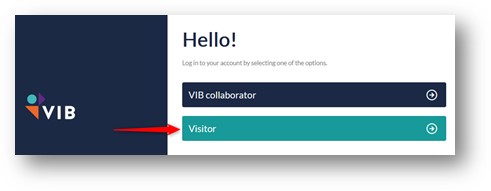
- You will then have to select if you're a 'VIB Collaborator' or a 'Visitor'.
- If you're a VIB Collaborator please log in with your VIB account. You will be redirected to the ticket overview page and press 'checkout' at the bottom to continue.
- If you're a Visitor and have an account please log in. You will be redirected to the ticket overview page and press 'checkout' at the bottom to continue.
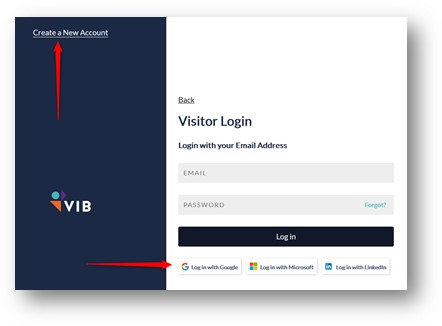
- If you do not yet have an account, please select 'Create a New Account'
- Once you’ve filled in the form, you will be sent a confirmation e-mail
- Click the link in this e-mail and you will be taken back to the account page; please click continue to go back to the ticket overview window and press 'checkout' at the bottom
- Please fill in the ticket info of the person attending the conference and if you want to add a conference dinner to the shopping cart
- add coupon codes if you have received one
- click 'next' at the bottom
- You will be asked for some additional info:
- how you heard about the meeting
- if you agree with the terms conditions & privacy policy
- click next
- Please check your customer info
- If incorrect, please change it
- click next
- Please fill in the Billing info
- if you require an invoice, please check the mark and fill in the accounting details
- add an external reference if needed
- press next
- Select your preferred payment method
- you will be redirected to the payment window; please fill in your card details and press continue
- Your registration is now complete
If you experience any problems during this process, please contact us at trainingandconferences@vib.be.
I'm a VIB Collaborator and want to register
I'm a VIB Collaborator and want to register
If you want to register for a VIB training or conference, you will need a project code. This will be used to process the payment for the meeting. Please ask either your group leader or administrative assistant for more information regarding this info.
How to login on the VIB e-learning platform?
How to login on the VIB e-learning platform?
Go to https://elearning.vib.be and
Click on Account , Login and then Login with OpenID Connect
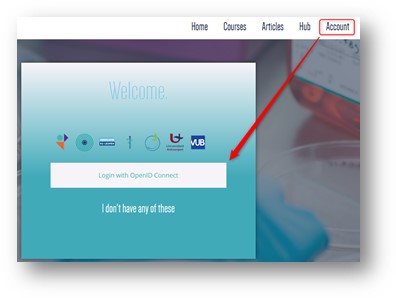
- Choose VIB collaborator if you are VIB. Log in with your VIB account. Otherwise choose Visitor.
- Log on using a social media account -Google, Microsoft & LinkedIn, or use Create a New Account to create an account based on email address.
- Click Courses in the top menu and search for the course you are interested in.
To check if you’re logged in: go to Courses and see if your name appears in the top right corner of the page.
If you have trouble logging in, go incognito in your browser and try again.
How does Belgian VAT work?
How does Belgian VAT work?
The VAT rules in Belgium for events:
- The event takes place in Belgium => Belgian VAT will be charged to each participant (21% on the registration price).
- The event takes place online = there is no place marking:
- Belgian participants: Belgian VAT will be charged (21%).
- Foreign participants in Europe:
- European people without VAT number pay Belgian VAT (21%).
- For European people with VAT numbers, a reverse charge of VAT applies (no Belgian VAT).
- they must pay VAT in the country where they are registered = there is a VAT shift – intra-community.
- Foreign participants outside Europe:
- People from outside the EU do not pay Belgian VAT.
The charging of VAT depends on the place where the event takes place.
I am a VIB alumni, do I get a discount?
I am a VIB alumni, do I get a discount?
Yes! We would like to stay in touch with our former colleagues; therefore, VIB Alumni will receive a discount for attending a VIB conference.
Send us an e-mail at trainingandconferences@vib.be to receive your coupon. Make sure to mention the meeting you would like to visit and which lab you worked at during your time at VIB.
What does the registration fee cover?
What does the registration fee cover?
For a VIB conference:
- Live tickets include plenary sessions, poster sessions, lunches & coffee breaks, networking reception, and a certificate of attendance.
- Virtual tickets include livestreamed and recorded talks only. No interaction with participants or access to poster sessions.
For a VIB training, the registration fee includes:
- access to the training sessions
- all training materials
- welcome coffee and coffee breaks
- lunch (depending on the duration of the training)
The registration fees do not include:
- travel costs
- hotel costs
I don't belong to the target audience, but I really would like to attend a specific training. What can I do?
I don't belong to the target audience, but I really would like to attend a specific training. What can I do?
If you don't belong to the target audience of a training, feel free to contact trainingandconferences@vib.be to motivate why you think this training would be useful for you. We will contact you asap to discuss with you.
New account
After creating a new account I didn't receive a confirmation e-mail, what do I do now?
After creating a new account I didn't receive a confirmation e-mail, what do I do now?
Not receiving a confirmation e-mail is often linked to two causes:
- The e-mail address you entered is not correct. As a result the confirmation e-mail will bounce and you will never receive it.
- The e-mail got stuck in your spam folder.
If your spam folder is empty or you did not receive the confirmation email, please send an e-mail to trainingandconferences@vib.be and we'll contact you as soon as possible.
I forgot my password
I forgot my password
- Go to the log in icon at the top right corner of the website
- Select any account
- Click on 'Reset your password'
- Enter your email address and press 'Submit'
- If you don't receive any mail from our platform, please check your spam folder
How to change your password
How to change your password
- Go to the log in icon at the top right corner of the website
- Select any account
- Click on 'Reset your password'
- Enter your email address and press 'Submit'
- If you don't receive any mail from our platform, please check your spam folder
Payment
My payment has failed, what should I do?
My payment has failed, what should I do?
A failed/ declined payment can occur due to different causes.
- Credit card - declined reasons:
- (insufficient funds)
- (Suspected Fraud)
- (Expired Card)
- (3DS Authentication Failed / Card Authentication Failed)
- 3D Secure - Since 2021 there have been extra security measures set up for credit card payments to prevent internet fraud. This is called the 3DS or 3D Secure feature. This means you will be prompted for a confirmation code, which you will receive via e-mail or phone. If the payment has failed and you did not receive a prompt for a confirmation code, make sure to try a different browser to solve this. Or empty your cache/cookies of your browser and try again.
- (3DS Authentication Failed / Transaction Not Permitted To Cardholder)
- The solution is to contact your bank to activate the 3D security authentication on your card. In short, 3D Secure is a secure online payment system developed by Visa and MasterCard. This payment system offers maximum protection against online bank fraud. It requires you to verify your identity as the owner of your card and is only available for Visa and MasterCard accounts. You find more info on the respective Visa and MasterCard websites. (You can contact your bank and ask if this feature can be activated on your card).
- (Declined, Not Verified)
- You should also be aware that some banks have certain suppliers on a blacklist. As a consequence, your bank does not allow you to pay the supplier. To prevent this, we advise you to get in contact with your bank and ask them to check if our domain is recognized as a trusted supplier.
- Browser - The problem can be linked to the browser you use or even the browser version. Make sure to try another browser to see if that’s the case.
- Firewall - If this doesn’t help, we suggest trying to do the registration on another computer in another place. Some firewall settings don’t allow people to make payments to unknown suppliers. In some companies, that is the case, and this blocks the user from finalizing a payment.
If these suggestions don’t make a difference, we suggest you send an e-mail to trainingandconferences@vib.be and we will look for a solution.
I need an invoice
I need an invoice
All participants automatically receive a payment confirmation after registering for an event. If you need an invoice, please tick the corresponding box ‘I need an invoice’ during the registration process and provide your VAT number.
You will receive the final invoice once payment has been made. Belgian attendees will receive the company invoice through Peppol.
If you need a proforma invoice, please select the payment method BankTransfer. The process is as follows:
- A proforma invoice is issued after the registration process
- Please make your payment based on the reference number found on the proforma invoice
- Once your payment is received and confirmed, a final invoice will be issued and sent to your email address
Both the pro forma and final invoices are sent to the email address linked to the account used for registration.
Please note that if you choose to pay by bank transfer, the final invoice will be issued only after payment is completed. Payment must always be made in accordance with the proforma invoice. Depending on your bank, processing may take up to five (5) business days.
I would like to register with a PO
I would like to register with a PO
In case you would like to register with a Purchase Order (PO), please follow these steps:
- Put the number of tickets & sub-products in your cart on the event page
- Create an account if you don’t have one and log in.
- Complete the ticket info & follow the steps until you arrive at the billing section
- Click ‘I need an invoice’ and insert the accounting details of your institute or company.
- Add your PO number or reference in the 'External reference' box
- Choose bank transfer as a payment option.
- Finish your order – you will receive a pro forma invoice that contains all necessary information to perform your payment (No official invoices in advance).
- Make sure you use the correct 16-digit payment reference when you transfer the registration fee. Never combine references (One order = one payment). Your order can contain multiple tickets and/or sub-products. (If you use an incorrect reference, the registration fee cannot be connected to your order and will be refunded, with no registration as a result).
- Once the registration fee arrives in our bank account with the correct payment reference, your order will close, and you will receive the original invoice automatically. (this can take up to 4 or 5 days).
How do I register as a VIB employee?
How do I register as a VIB employee?
When you work for VIB, you can log in to the website at the top right corner, using the button VIB collaborator.
For VIB employees, we work with internal transfers, so after the check-out, you can choose your VIB project code to complete the order. Once you have received an email with your order confirmation, your payment is complete.
How does BankTransfer work?
How does BankTransfer work?
A BankTransfer is not automatically wired from your bank account. You will need to manually pay the amount. Please follow the steps as follows:
- Start the registration process.
- In the payment segment:
- Select the payment method ‘Bank Transfer’
- Follow the steps until finished
- You will receive a separate email from the system with the details to transfer the amount for the registration via Bank Transfer. You can forward this email to your institute’s administration if needed.
- Please use the correct payment reference (16-digit code) stated in the email for your wire transfer. Otherwise, your order won’t be linked, and when the latter happens, the system will automatically transfer the money back to your account, and your order won’t be completed. Don’t use a name or order number, just the 16-digit code.
- When the payment is done, you will receive an email with your confirmation of registration and your final invoice.
As long as the amount is not received on our account, your registration is not complete, meaning you are not registered for the event. From the moment we receive the amount, you will receive a confirmation of your inscription, and you will be added to the list of registrations.
Please keep in mind that the BankTransfer link will be open until 30 days after initialization. After that, it will expire, and you will have to start over.
What is Peppol and why is it required for Belgian companies?
What is Peppol and why is it required for Belgian companies?
Why is Peppol required for Belgian companies?
From 1 January 2026, Belgian law requires all VAT-registered businesses to send and receive invoices via the Peppol network. This ensures compliance, security, and faster processing. Traditional invoices (PDF or paper) will no longer be valid for B2B transactions.
What do I need to provide during registration?
If your company is VAT-registered in Belgium:
- You must provide your company VAT number, company number or GLN number during registration.
- These identifiers allow us to issue your invoice through Peppol in compliance with Belgian law.
Can I complete payment without this information?
Yes. You can pay now and provide your VAT, company or GLN number later.
However, if you do not provide this information within 15 days after registration, you will receive an invoice for personal use and not for your company.
What is a GLN number?
A Global Location Number (GLN) is a GS1 identifier that uniquely identifies a specific location or department within a company.
If you don’t know your GLN, your VAT number is usually sufficient.
Will I still be able to attend the event if I don’t provide these details?
Yes, you can attend the event. The only consequence is that no company invoice will be issued unless the required details are provided.
How will I receive my invoice?
Your invoice will be send directly to the Peppol platform. You will not receive it any longer through email. Should you want to receive the invoice for informational purposes, please send and email to trainingandconferences@vib.be.
Cancellation policy
I want to cancel my registration, how does it work?
I want to cancel my registration, how does it work?
For a VIB conference:
In case you want to cancel your registration, please send a request to trainingandconferences@vib.be
- All notifications received 2 months before the start of the event get refunded for 100% minus an administrative fee of 50 euros.
- All notifications received between 1 and 2 months before the start of the event get refunded for 50% minus an administrative fee of 50 euros.
- Cancellation requests received less than 1 month before the start of the event won’t be refunded.
For a VIB training:
Cancellations can be made via "My account" on the training registration page. Under "Manage this order", you will find the cancellation option. For cancellations less than 2 weeks before the course, please notify us by email at trainingandconferences@vib.be.
In case of no-show without timely notification or valid justification (medical attestation in case of illness, a clarification by your group leader in any other case), following actions will be taken:
- For free courses:
- A no-show fee of €100 (in-person) or €50 (online) will be charged.
- For VIB staff, this fee will be charged to the Lab, Unit, or Core Facility.
- For paid courses:
- no refund will be issued in case of no-show.
Please find our cancellation policy here.
An event gets cancelled due to pandemic restrictions, what now?
An event gets cancelled due to pandemic restrictions, what now?
VIB Training & Conferences will follow the rules set up by the Belgian government.
If VIB needs to cancel a live event due to pandemic restrictions, you will have the chance to join the event virtually or get reimbursed for your ticket. Should VIB cancel the event entirely due to pandemic restrictions, you will get reimbursed.
E-mail notifications
I don't receive email updates
I don't receive email updates
Once you are registered for one of our events, you will receive regular e-mail updates. In case you do not receive any updates, this means the e-mails don't find their way to your inbox. This can be caused by different factors:
- Check your spam-folder: It is possible that you did receive our e-mails but they got stuck in your spam folder. This means your e-mail client doesn't see our trainingandconferences@vib.be account as trustworthy.
- Confirm our e-mail account in your e-mail clients' whitelist: A whitelist is a record of the e-mail accounts that are valuable and trustworthy. To prevent problems in receiving e-mails, it is important to add our e-mail account to your client's whitelist. More info
- Your organization's server settings: In case our e-mails do not get to you, it is plausible that they got blocked by your organization's e-mail server firewall. To prevent this you can ask your IT admin to check whether the domain of our e-mail account is on the server's blacklist.
Travel grants
How do I apply for a VIB Travel Grant?
How do I apply for a VIB Travel Grant?
To apply for a grant, submit your motivation by clicking on the 'Apply here' button on the website of the conference of your choice. The organizing committee will notify you of your travel grant acceptance before the abstract submission deadline. No registration is needed before submitting a travel grant proposal. When you’re awarded a travel grant, you will receive a practical email containing the next steps. Note that being awarded a travel grant does not mean being registered for the conference.
The events that are part of the VIB Conference series will offer travel grants. For VIB Science events, this option might not be available, so make sure to check the conference website of your interest.
Are there other organizations that offer travel grants for attending international events?
Are there other organizations that offer travel grants for attending international events?
Yes, there are quite a few of them. We've tried to compile a list for you and will keep expanding this. If we're missing one that you know of, make sure to let us know.
- Travel Funding opportunities for Postdocs
- Travel grants for Early Career Researchers
- Nature Travel Grants
- We Make Scholars
- EURAXESS UK (for UK researchers only)
- DMM Conference Travel Grants
- Royal Society of Biology Conference Grants (for UK researchers only)
- Open Travel Grants
- Hello Bio - Travel Grants
Make sure to also check your own research institute or university as there maybe options there as well.
Abstract information
Abstract restrictions
Abstract restrictions
- Title: the length of the title should not exceed 15 words.
- Authors & affiliations: Limit the number of authors as much as possible & don’t add addresses in the affiliations.
- Abstract body text: The body text is limited to 1750 characters.
- If you copy-paste your text, please make sure the text isn’t cut off when you submit your abstract.
- If you use special symbols in your abstract, please use Unicode characters; otherwise, these characters will not be recognized.
- please don’t use these characters in your body text ">" and "<" as they cause errors in the website platform.
- Review of your abstract: The selected talks are chosen in the 1 or 2 weeks after the abstract deadline.
What format should your poster have?
What format should your poster have?
The format for your poster should be as follows:
- A0 (841 x 1189 mm / 33.1 x 46.8 in)
- Portrait orientation
How to design a poster that creates awareness?
How to design a poster that creates awareness?
How do you create a poster that attracts attention and says it all without making it look like an explosion of information? Here are a few tips to design a powerful poster.
If I submit an abstract, is my spot at the conference guaranteed?
If I submit an abstract, is my spot at the conference guaranteed?
Submitting an abstract does not guarantee a spot at the conference. A paid and confirmed registration ticket is needed. Spots at the conference are on a first-come, first-served basis. If you want to be sure of a spot when you have submitted an abstract, please register via the website at your earliest convenience.